


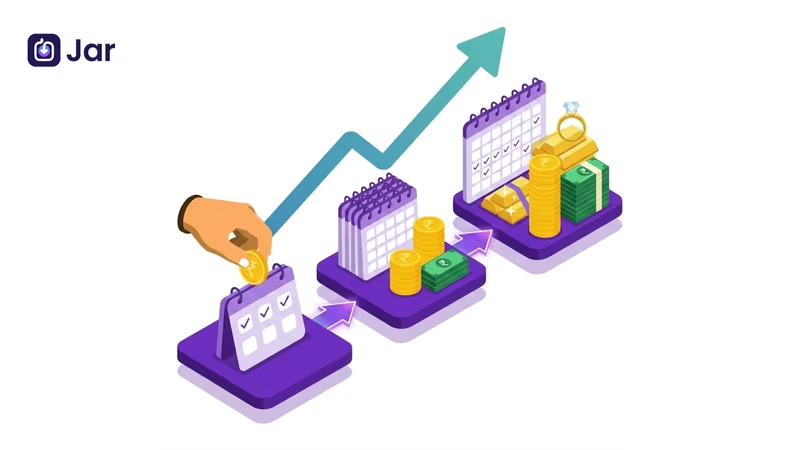


Most people don't fail at saving because they lack discipline. They fail because they rely on willpower, and willpower runs out. The moment you have to decide to save every day, you've already made it ten times harder than it needs to be.
That's exactly the problem Jar App solves. By automating your savings into 99.95% pure digital gold, Jar removes the decision entirely. Set it once, and your money moves before you even think about spending it.
This guide covers everything: how to enable daily, weekly, and monthly savings on Jar, how to change or pause your plan, what happens when your balance runs low, and which savings frequency actually suits your lifestyle. Why AutoSavings Works Better Than Lump Sum
Saving a big chunk of money at the end of the month sounds logical, but it almost never works. By the time the month ends, there's usually not much left. Automated microsavings flips the script entirely.
The "Pay Yourself First" Principle
When savings happen automatically at the start of a cycle, whether daily, weekly, or monthly, you naturally adjust your spending to whatever's left. This is the foundation of every solid personal finance habit. Jar operationalises it in under a minute.
Why Digital Gold Makes This Even Smarter
Jar routes your automated savings into digital gold, unlike a savings account that quietly loses value to inflation. Gold has historically served as a hedge against inflation, and with Jar, you're buying it in small, consistent amounts, a strategy called "rupee cost averaging", which smooths out price fluctuations over time.
Every rupee you save through Jar is backed by 99.95% pure 24K digital gold, stored in insured vaults. You're not just saving; you're building an asset. How to Enable Daily Savings on Jar.
Daily savings is Jar's signature feature. It works by automatically deducting a small, preset amount every day and converting it into digital gold as little as ₹10.
How to Enable Daily Savings on Jar
Step-by-step:
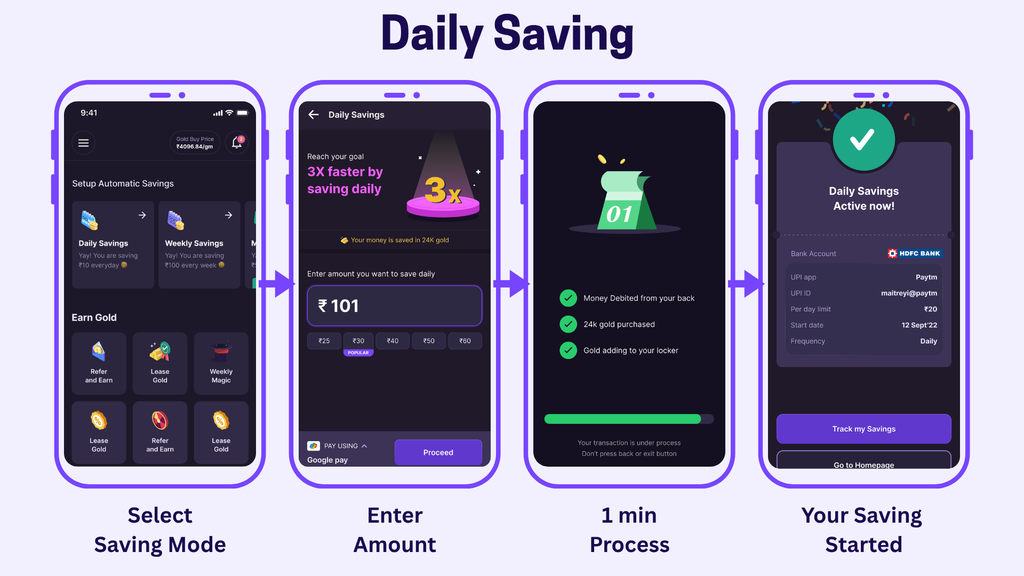
- Locate Savings Section: Open the Jar App and scroll to the "Setup Automatic Savings" section on the home screen.
- Select Daily Savings: Tap the "Daily Savings" option to choose your savings mode.
- Enter Amount: Type your desired daily savings amount or select one of the preset quick chips (e.g., ₹25, ₹30, or ₹40).
- Choose Payment & Proceed: Select your preferred payment method (e.g., Google Pay) under "PAY USING" and tap "Proceed".
- Processing: Wait briefly for the automated process to complete as your funds are debited, 24k gold is purchased, and it is added to your locker.
- Confirmation: Once finished, you will land on the "Daily Savings Active Now!" screen showing your active plan details. From here, you can tap "Track my Savings" or return to the homepage.
The entire setup takes approximately 45 seconds. From the next savings cycle, Jar will take care of the rest automatically.
Start saving ₹10 everyday in digital gold.
How to Enable Weekly Savings on Jar
Weekly savings gives you a slightly larger single deduction once a week, useful if you prefer savings that align with a weekly budget or salary cycle.
Step-by-step:
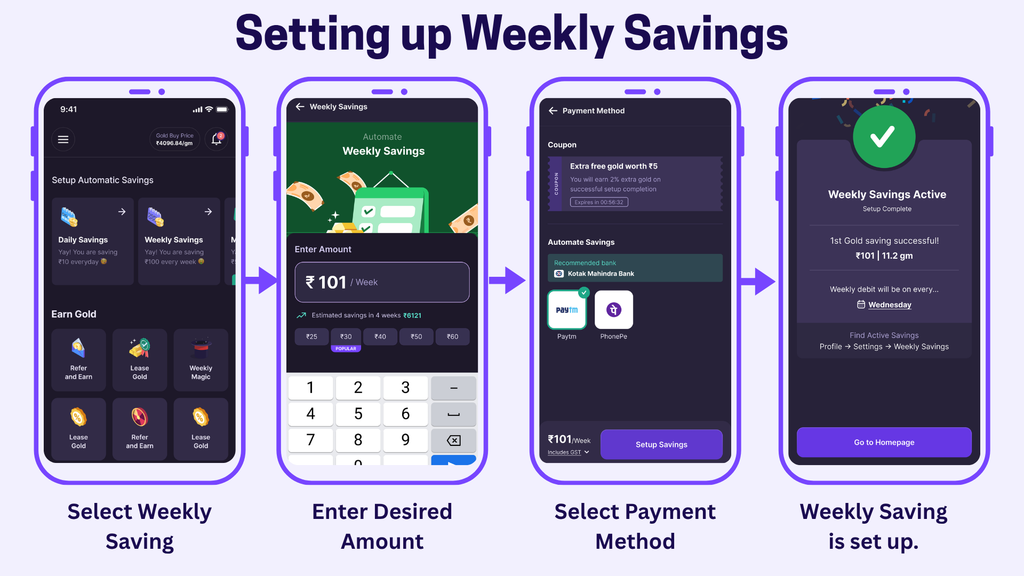
1. Launch the Jar App on your device.
2. From the home screen, scroll down to "Setup Automatic Savings" and tap "Weekly Savings."
3. On the Savings Plan page, you'll see "Weekly" and "Monthly" tabs. The "Weekly" option will be preselected; keep it there.
4. Enter your desired weekly savings amount manually or use the slider.
5. The allowed range is ₹100 to ₹5,000 per week.
6. Tap "Proceed" to move to the AutoSave page.
7. Read through the "How Does This Work" section to understand the deduction schedule.
8. Confirm your payment preferences and tap Proceed to activate.
Your weekly savings in Digital Gold will now run automatically on the same day each week.
Set up weekly saving in under a minute
How to Use Instant Savings on Jar
Not every saver wants to commit to a recurring schedule right away, and that's fine. Instant Savings lets you buy digital gold whenever you want, in whatever amount suits you, with no autopay setup and no fixed cycle. It's the fastest way to start, and it's also perfect for topping up your gold balance whenever the price looks good.
Step-by-step:
- Open the Jar App and make sure you're on the latest version.
- From the home screen, look for "Instant Savings" (or the "Buy Gold Now" option).
- Enter the amount you want to save right now; there's no minimum lock-in beyond Jar's standard ₹10 floor.
- Confirm your payment method (UPI or linked account).
- Tap "Save Now" to complete the purchase.
- Your digital gold is credited instantly to your jar balance.
A handy extra: Jar also lets you set gold price alerts, so you get notified when prices dip, making Instant Savings a smart way to buy gold opportunistically instead of on autopilot.
Save any amount, anytime — download Jar now.
How to Enable Monthly Savings on Jar
Monthly savings is ideal for salaried individuals who prefer to align savings with their pay cycle, a single, larger deduction once a month.
Step-by-step:
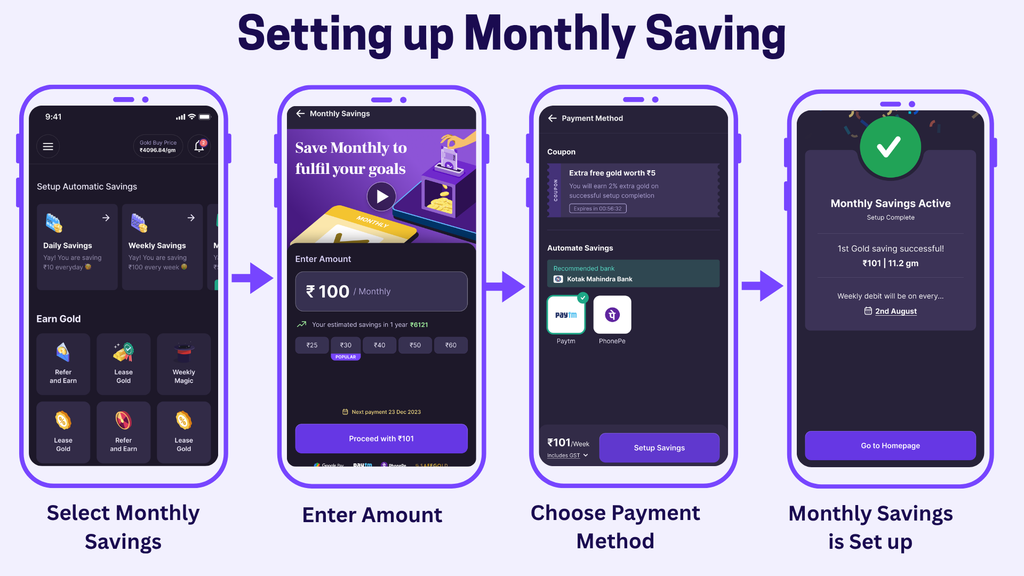
1. Open the Jar app and ensure you have the latest version installed.
2. From the home screen, scroll to "Setup Automatic Savings" and select "Monthly Savings." 3. On the Savings Plan page, you'll see "Monthly" and "Weekly" tabs. The "Monthly" tab is preselected; stay on it.
4. Use the slider to choose your monthly savings amount.
5. The range is ₹500 to ₹15,000 per month.
6. Tap "Proceed" to reach the AutoSave configuration screen.
7. Select your preferred payment automation method.
8. Click Proceed one final time.
Your Monthly Digital Gold Savings Plan will automatically begin from the next cycle.
Align your savings with payday Savings Plan Comparison at a Glance
Daily vs Weekly vs Monthly – Which Is Best for You?
There's no universally correct answer here. The best savings frequency is the one that fits how money actually flows through your life.
Choose Daily Savings
You're building a savings habit from scratch, earning through gig work or irregular daily income, or seeking the psychological momentum of watching your gold balance grow every single day. Even ₹50/day compounds into meaningful wealth over time, and the daily reinforcement keeps you engaged.
Choose Weekly Savings
You manage your spending with a weekly budget, receive weekly pay, or find daily deductions too granular for your lifestyle. Weekly savings hit a sweet spot between building consistency and not overmanaging your finances.
Choose Monthly Savings
You're salaried with a fixed monthly income, and you already budget on a monthly cycle. A single larger deduction at the start of the month, right after your salary hits, is the cleanest way to enforce the "pay yourself first" rule without constant micromanagement.
The honest answer: many Jar users run a combination. A small daily autosave running in the background plus a larger monthly contribution is a genuinely powerful strategy that balances habit-building with serious wealth accumulation.
How to Stop / Disable Auto Savings
If you want to stop your savings plan entirely rather than pause it, Jar gives you that option too.
Go into your active savings plan, scroll to the plan management options, and select "Stop" or "Disable AutoSave." You'll typically be asked to confirm this action. Once stopped, no further automatic deductions will occur.
Your accumulated digital gold balance remains in your account; stopping the savings plan doesn't affect your existing holdings. You can sell, hold, or withdraw your gold balance independently of whether a savings plan is active. What Happens If Your Balance Is Low on Savings Day?
This is one of the most common concerns people have before setting up autosavings: what if the money isn't there?
If your linked account or UPI wallet has insufficient funds on a scheduled savings day, Jar will typically skip that day's deduction rather than charging any penalty. The app notifies you of the failed deduction so you're aware. No overdraft fees, no failedpayment charges the system is designed to be forgiving.
That said, consistently low balances on savings days might indicate your savings amount is set higher than your current cash flow comfortably supports. In that case, revisiting your savings amount (as described above) is the practical move. How to Change Your Savings Amount
Life changes your income, your goals and your expenses. Jar lets you update your savings amount without cancelling and restarting the whole plan.
To change your savings amount: open the Jar app, navigate to your active savings plan (daily, weekly, or monthly), tap on the plan to open its settings, and select the option to edit or update the amount. Use the slider or type in a new value within the allowed range, then confirm. The new amount takes effect from your next scheduled deduction.
If you find your current amount too aggressive or not aggressive enough, adjusting it regularly is actually a healthy savings habit, not a failure. How to Pause Savings Temporarily Sometimes you need breathing room, a big unexpected expense, a month with fewer paychecks, or just a deliberate financial reset. Jar lets you pause your automatic savings without deleting your plan entirely. Step-by-step to pause: Open the Jar App and go to your active savings plan (daily, weekly, or monthly). Tap on the plan to open its settings. Look for the "Pause" option.
Select your pause duration, or simply confirm the pause if no duration is requested. Confirm your choice. Your plan is now paused, and no further deductions will happen until you resume. Your existing Digital Gold balance is completely untouched while paused, it just sits safely in your account.
Step-by-step to resume:
Open the Jar App and go to the same paused savings plan.
Tap on the plan to open its settings. Look for the "Resume" or "Reactivate" option. Confirm to reactivate. Your plan picks up on its original schedule from the next cycle.
This is far smarter than cancelling your plan altogether; you preserve your setup, your payment method linkage, and the habit momentum you've built.
Start Small, Build Something Real
The difference between people who successfully build wealth and those who don't usually isn't income it's systems. Automating even ₹50 a day into an appreciating asset like Digital Gold is a fundamentally different move than leaving money idle in a savings account or, worse, spending it before the month ends.
Jar makes the system effortless. Whether you start with daily microsavings or set up a monthly plan that mirrors your salary cycle, the key step is the same: get it running. The account takes 45 seconds. The habit takes a week to feel normal. The results take time but they're real.
FAQ
Can I run daily, weekly, and monthly savings plans on Jar simultaneously?
The Jar app allows you to set up automatic savings plans, and many users combine different frequencies to maximise their digital gold accumulation. Check your current app version for the exact configuration options, as we regularly update features.
What is the minimum amount I can save daily on Jar?
The minimum daily savings amount on Jar is ₹10, which makes it genuinely accessible for anyone starting out. You can save up to ₹500 per day through the daily plan.
Is the digital gold on Jar actually backed by physical gold?
Yes. Every rupee saved through Jar is converted into 99.95% pure 24K digital gold that is physically stored in secure, insured vaults. You own actual gold; you're not just tracking a price index.
How long does it take to set up automatic savings on Jar?
Account setup on Jar takes approximately 45 seconds. Once your account is active, enabling an automatic savings plan takes just a few additional taps typically under a minute from opening the app to having your plan live.
Can I withdraw or sell my digital gold anytime?
Yes. Your accumulated Digital Gold balance on Jar can be sold or withdrawn at any time, regardless of whether you have an active savings plan running. Your savings and your balance are managed independently.
What happens to my gold if I pause or stop my savings plan?
Nothing. Pausing or stopping your automatic savings plan has zero effect on your existing Digital Gold balance. The gold you've already accumulated continues to sit in your vault, and you can access it whenever you choose.