


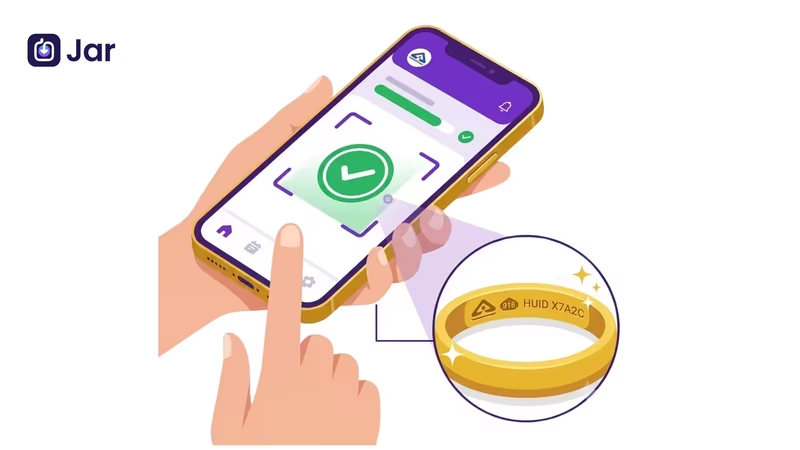


You're at a jeweller's counter. The ring looks good, the price seems fair, and the bill says 22K. But how do you know the gold really matches that bill? That's where the HUID comes in.
HUID stands for Hallmark Unique Identification. It's a six-character code of letters and numbers, laser-inscribed on hallmarked gold jewellery in India. You can check it on the BIS Care app in a minute or two.
This guide walks you through the process, explains what the results mean, and covers what to do if something doesn't add up.
Key Highlights
- A HUID is a six-character code laser-inscribed on BIS-hallmarked gold jewellery.
- The BIS Care app shows registration and certification details linked to the code, but not the weight or the owner's name.
- Verification takes four steps: open the app, enter the code exactly, read the output, and compare it with your bill.
- A "record not found" result doesn't always mean fraud. Re-check the code first, then try again later.
- If a piece fails the check, you have complaint options through the BIS Care portal.
Understanding the Hallmark Triad: What HUID Actually Confirms (and What It Doesn't)
A BIS hallmark gold piece carries three marks: the BIS logo, the purity grade, and the HUID. Together, they show who tested the gold, how pure it's supposed to be, and which specific piece was tested. Knowing what each mark means makes it much easier to read a bill.
The 3 Mandatory Symbols: BIS Standard Mark, Purity Grade, and the 6-Digit Alphanumeric Code
The BIS hallmark logo is the triangular mark. The purity grade is a number such as 916 (22K) or 750 (18K). The HUID is the unique six-character code that ties the piece to a specific record. If you're not sure how karat and purity numbers relate, 22K vs 24K gold purity explains the differences in simple terms.
HUID vs. Invoice Weight: Why the App Shows Jeweller Details and Purity, but Never Grams
The HUID links a piece to its registration and certification. It doesn't record how many grams the piece weighs or what you paid. The app won't show you weight, making charges, or the price. Those details belong on your bill, so always keep it.
Laser Inscription Decoded: Finding the Microscopic Code on Rings, Chains, and Bangles
The HUID is very small, so you may need good light and a magnifying glass. Look for the code where the BIS hallmark on gold is stamped: inside a ring band, on a chain clasp or link, or along the inner surface of a bangle. If you can't find a HUID at all, ask the jeweller why. Not sure how a real hallmark differs from a lookalike? Our guide on KDM, 916 and BIS gold explains the markings you'll come across and what they mean.
Pre-Verification Setup: Getting the Official BIS Care App Ready
Verifying Authenticity: Downloading from Official App Store / Play Store (Avoiding Phishing Clones)
Download the BIS Care app only from the official Google Play Store or Apple App Store, and check the developer name before you install. Be wary of fake apps and links sent over WhatsApp or SMS. They may ask for personal details or payments. Verifying a HUID shouldn't require you to pay anything or share your bank details. The app is one tool, and other ways to check gold purity can help you cross-check a piece.
Registration vs. Guest Access: Why Setting Up Your Profile Unlocks Redressal Features
You can usually run a basic check without creating a profile. But if you ever need to file a complaint, you'll want an account. Set one up early, while you're calm and not in the middle of a dispute.
Permissions Audit: Why the App Needs Camera Access for Optical Verification
If the app offers a scan option, it needs camera access to use it. You can always type the code in by hand instead. Allow camera access only if you want the scanning feature, and check the app's permission screen before you agree.
The 4-Step Verification Protocol: How to Check HUID on the BIS Care App
Have the piece and your bill with you. Here's how to verify HUID step by step.
Step 1: Navigating to the 'Verify HUID' Module on the Home Dashboard
Open the app and look for the HUID verification option on the home screen. Menu labels can change between app versions, so look for the word HUID.
Step 2: Entering the Exact 6-Digit Alphanumeric Code (Case-Sensitivity & Zero vs. 'O' Traps)
Type all six characters exactly as they're engraved. The most common mistakes are 0 (zero) vs. O (the letter), and 8 vs. B. Read the code twice before you submit. A single wrong character will return the wrong result.
Step 3: Decoding the Verification Output (Jeweller Registration ID, AHC Code, Article Type)
A successful check usually shows the jeweller's registration details, the Assaying and Hallmarking Centre (AHC) code, and the article type, such as a ring or a chain. Write these down. They're your record if you need to raise a question later.
Step 4: Cross-Referencing the App's Purity Stamp (e.g., 22K916) with Your Retail Tax Invoice
Compare the purity on the app with the purity on your bill. If the piece is marked 916, the app should show the same grade, and your bill should say 22K. Also check that the jeweller's name and the item description match. If the bill says 22K but the record shows something different, don't pay until the jeweller explains. For a quick guide to the rest of the bill, read how to read a jeweller's bill.
The Verification Output Matrix: Decoding Green Flags vs. Red Flags
The "Match Found" Scenario: Confirming the AHC (Assaying & Hallmarking Centre) Certification Date
A match means the code is registered in the system. Check the certification date and make sure the jeweller and purity line up with your bill. A match is a good sign, but it isn't a guarantee on its own. The physical piece and your paperwork should agree too.
The "Record Not Found" Alert: Distinguishing System Sync Latency from Fraudulent Stamps
A "record not found" result doesn't always mean the gold is fake. First, re-check the code, especially 0 vs. O. If it's still not found, wait a day or two and try again, because new records can take time to appear. If it still fails, treat it as a red flag and ask the jeweller for an explanation in writing.
Category Mismatch: What to Do if a "Bangle" Shows Up as a "Ring" in BIS Records
If the article type in the app doesn't match the piece, don't ignore it. Ask the jeweller why, and check how the item is described on your bill. It may be a simple data error. Still, raise it before you pay.
Beyond Verification: What to Do if Your Jewellery Fails the BIS Check
The Jeweller Escalation Protocol: Re-verification at an Off-Site BIS-Recognized Lab
Start by asking the jeweller to re-check the piece in front of you and explain the result. If you still have doubts, ask for an independent test at a BIS-recognised assaying and hallmarking centre. Get the result in writing.
Invoking Section 33 of BIS Act 2016: Your Right to 2X Testing Compensation for Sub-Standard Purity
The BIS Act, 2016 sets out penalties for selling hallmarked jewellery that doesn't meet the declared standard. It also gives buyers ways to seek a remedy. The exact compensation you can claim depends on the facts of your case, so read the Act's text or ask a consumer forum before you rely on any specific figure.
In-App Grievance Filing: How to Log an Official Complaint Under the BIS Care Portal
If a piece fails the check, you can lodge a complaint through the BIS Care app or portal. Keep your bill, the HUID, clear photos of the piece, and screenshots of the verification result. Clear evidence makes it much easier for the authorities to act.
Edge Cases: Old Gold, Repaired Jewellery, and HUID Exemptions
Pre-April 2023 Hallmarks: How to Treat 4-Symbol Non-HUID Pieces During Resale or Exchange
Jewellery hallmarked before the six-digit HUID rules took full effect may not have a HUID. That doesn't automatically make it fake. But it can affect how the piece is valued when you sell or exchange it. Before you negotiate, check how tax applies to old gold exchanges in GST on old gold exchange.
Solder & Sizing Alterations: Does Resizing a Ring Void or Damage the Microscopic HUID?
Resizing involves heat and solder, which can affect the area where the hallmark sits. Ask the jeweller how they handle the HUID after a repair, and whether it's still readable. Don't assume the hallmark is gone, but do check the piece after any alteration.
Under-2-Gram Exemptions: Which Lightweight Gold Items Are Legally Exempt from HUID Mandates
Very light items are treated differently under hallmarking rules. Check the current notification from the
Bureau of Indian Standards before you rely on an exemption, because the rules have been revised over time.
Frequently Asked Questions
Can a jeweller refuse to sell gold if I insist on verifying HUID on the spot?
Checking the HUID on the spot is a reasonable request. A trustworthy jeweller will show you the code and help you check it. If a jeweller refuses to show the code or let you check the piece, treat that as a warning sign and consider buying elsewhere.
Why does the BIS Care app say "Invalid HUID" for newly purchased jewellery?
The most common reason is a typing mistake, such as 0 vs. O or 8 vs. B. Re-check the code against the piece. If the code is correct, the record may not be in the system yet, so try again after a day or two. If it still fails, ask the jeweller for the hallmark details in writing.
Does HUID verification show the name of the customer who previously bought or owned the piece?
No. HUID verification shows registration and certification details for the piece and the jeweller. It doesn't show the names of past owners, and it doesn't show the weight.
Is the 6-digit HUID mandatory on gold coins and bullion bars in India?
HUID rules mainly apply to hallmarked gold jewellery and artefacts. Coins and bars may be covered differently or not at all. Check the seller's documents and the current BIS rules before you buy.
Can the BIS Care app verify gold purity without an internet connection?
No. The app needs an internet connection to look up the HUID in the central record. Offline, you can note down the code and check it later, but you can't confirm the record until you're online.
Key Takeaways
A HUID is a six-character code that links a piece of hallmarked gold to its registration and certification record. To verify a HUID, check it on the BIS Care app by entering the code exactly as engraved, then compare the results with your bill. A "record not found" result needs a second look, not an automatic conclusion. If a piece fails, ask the jeweller for a written explanation, then use the BIS Care complaint process if needed. When you buy BIS hallmark jewellery, keep the bill and the HUID together.
If you're exploring gold beyond jewellery and want to avoid the hassle of checking the HUID on your jewellery, digital gold is one option. Jar gives you that option to save in digital gold through its app.